AI Halloween costume generator: see the 2026 trend costumes on you first
This AI Halloween costume generator puts a costume on your own selfie before you spend money on one. Pick a look below, upload a clear photo of yourself, and Nano Banana 2.1 Edit redraws the outfit and the setting while keeping your face. Every look is an original design that borrows the mood of a costume trending this year, not a copy of anyone's character.
Each card shows the result on the same fictional test portrait, the full editing prompt and the trend it riffs on. "Use this look" copies the prompt into the editor below and selects Nano Banana 2.1 Edit at 3:4; then upload your selfie and check the quote.
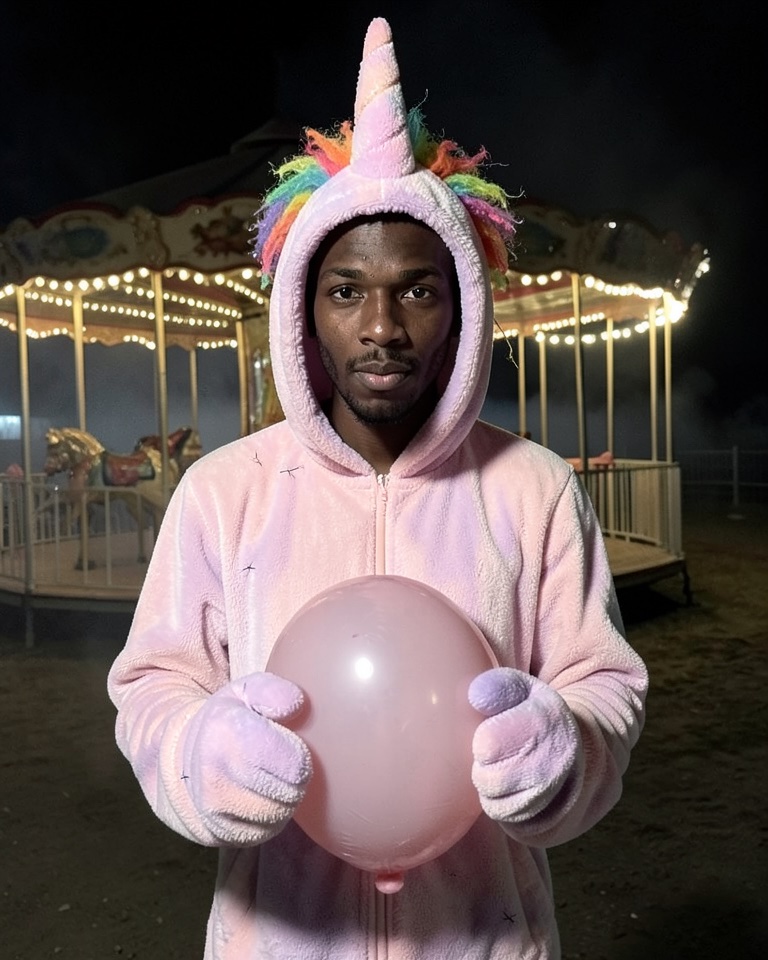
Haunted Carnival Unicorn Suit
A faded pastel unicorn mascot suit with a crooked horn, hood pushed back, alone at a foggy fairground. Our take on the Buddy the Unicorn craze that tops this year's costume searches.
Image editing prompt
Use the uploaded selfie as the only person. Keep the person's face, identity, own skin tone exactly as in the photo, age, hairline, facial hair and head proportions unchanged. Change only the outfit and setting: they wear a full-body plush unicorn mascot suit in faded pastel pink and lilac, the costume head pushed back like a hood so their whole face is visible, a crooked spiral horn, a matted rainbow mane with a few loose stitches, oversized mitten hands holding a deflated balloon. Setting: an empty fairground at night, a dark carousel behind them, a single warm string of bulbs, light fog. Waist-up portrait, realistic photo, slightly creepy but playful. Avoid changing the face or skin tone, extra fingers, blood, text, logos and watermarks.
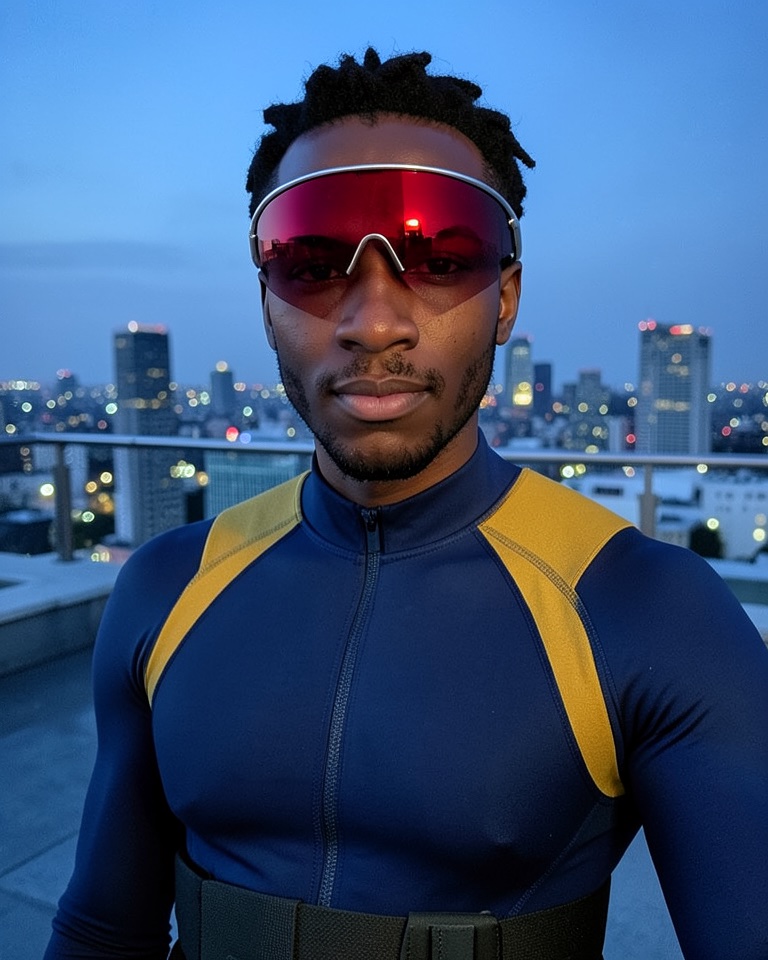
Ruby Visor Rooftop Sentinel
A navy and mustard tactical suit with a tinted ruby wraparound visor, shot on a rooftop at dusk. Fits anyone drawn to the visor-wearing X-hero revival without wearing a licensed suit.
Image editing prompt
Use the uploaded selfie as the only person. Keep the person's face, identity, own skin tone exactly as in the photo, age, hair and any facial hair unchanged. Change only the outfit, accessories and setting: they wear a fitted navy-blue tactical bodysuit with mustard-yellow panels across the shoulders, a wide black utility belt, and a sleek wraparound visor of tinted ruby-red glass in a thin silver frame, translucent enough that both eyes stay visible behind it. Setting: a rooftop at dusk with a city skyline and cool blue ambient light, a small red glint on the visor glass. Waist-up portrait, cinematic superhero still, sharp focus on the face. Avoid an opaque visor, glowing eyes, any emblem or letter on the chest, changed facial features, extra limbs, text and watermarks.
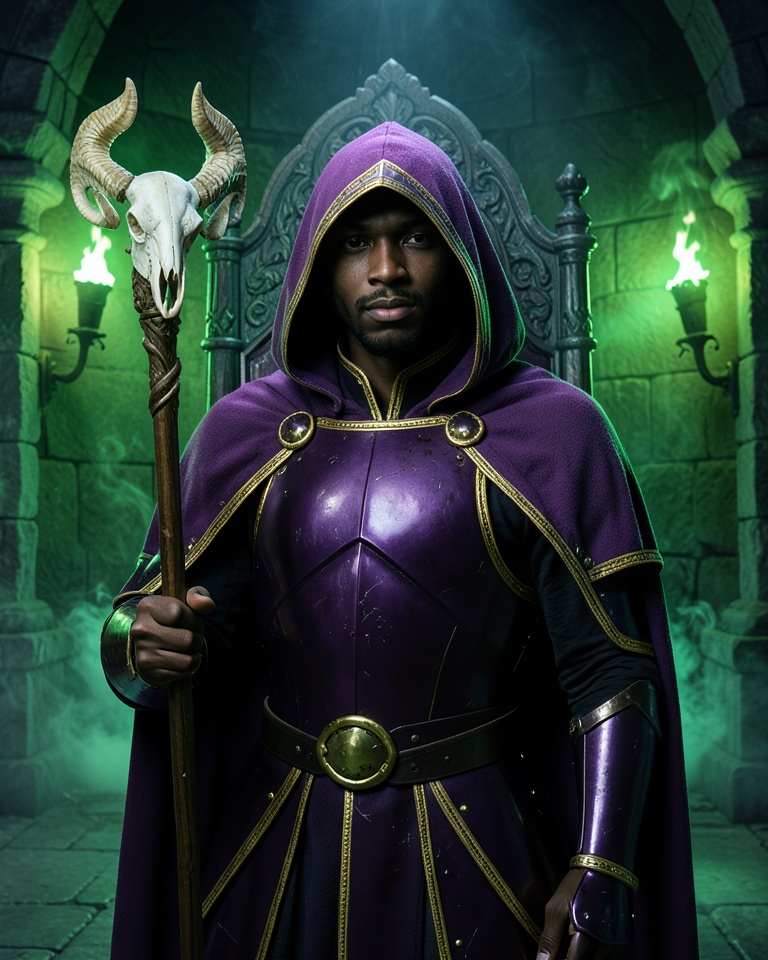
Violet Throne Bone Sorcerer
Purple plate armour, a gold-trimmed hood and a ram-skull staff in a green-lit throne room. The cartoon skull-faced villain look, kept wearable by leaving your real face showing.
Image editing prompt
Use the uploaded selfie as the only person. Keep the person's face, identity, own skin tone exactly as in the photo, age and any facial hair unchanged, with the face fully uncovered. Change only the costume and setting: they wear dark violet plate armour with a burnished gold trim, a heavy purple hooded cape with the hood up around their face, a high collar, and they hold a tall staff topped with a carved ivory ram skull. Setting: a ruined stone throne room lit by green torchlight and drifting smoke. Waist-up portrait, dramatic fantasy-film lighting, villain energy, realistic fabric and metal. Avoid turning the face into a skull, face paint that hides their features, gore, text, logos and watermarks.
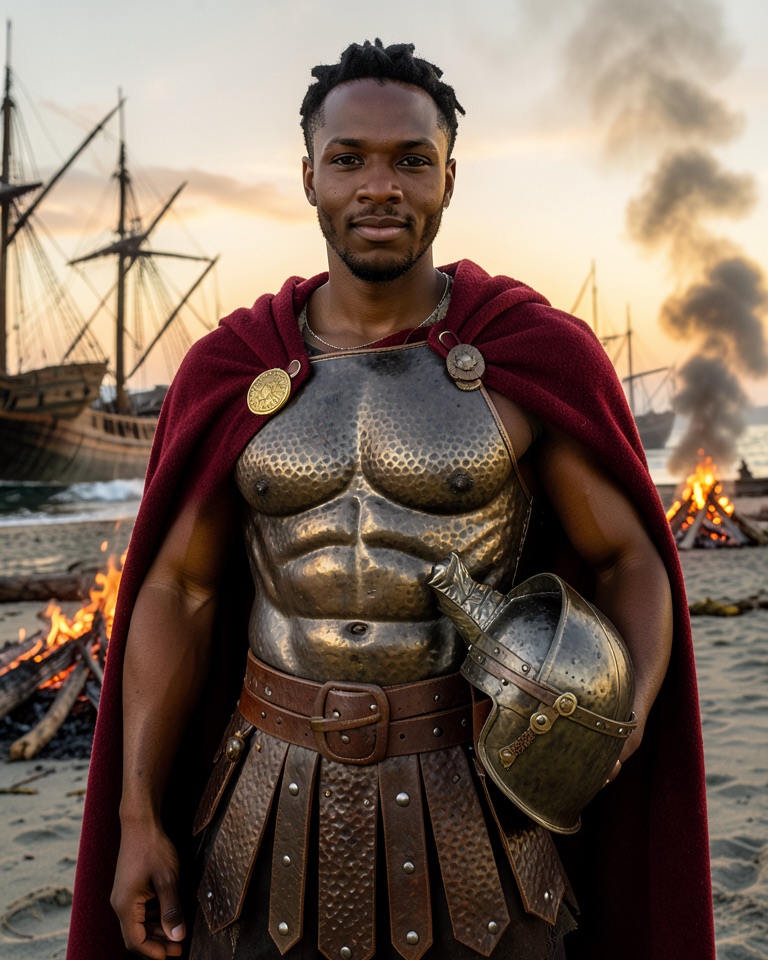
Bronze Age Beach Warlord
A hammered bronze cuirass, crimson cloak and crested helmet under one arm, with ships on the sand behind. A Greek warrior-king costume in the spirit of this year's Agamemnon searches.
Image editing prompt
Use the uploaded selfie as the only person. Keep the person's face, identity, own skin tone exactly as in the photo, age, hairstyle and any facial hair unchanged. Change only the costume and setting: they are a Bronze Age warrior ruler in a hammered bronze muscle cuirass, leather pteruges at the waist, a deep crimson wool cloak pinned at one shoulder with a gold disc brooch, and a crested bronze helmet tucked under one arm so their head is bare. Setting: a windy beach with beached wooden ships and campfire smoke at sunset. Waist-up portrait, epic historical-film look, warm low sun, realistic metal reflections. Avoid modern clothing, changing the face or skin tone, blood, text and watermarks.
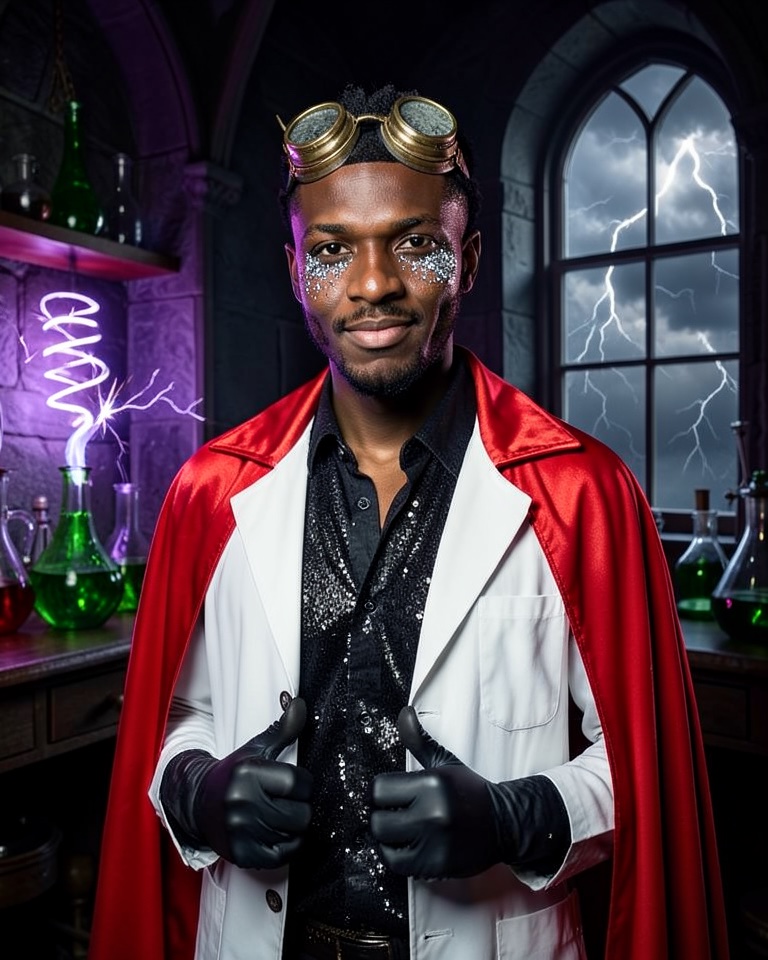
Glitter Coil Lab Scientist
A white lab coat over black sequins, a red-lined cape, brass goggles and a sparking castle lab. A glam-rock mad scientist that nods to cult-musical costumes without the corset.
Image editing prompt
Use the uploaded selfie as the only person. Keep the person's face, identity, own skin tone exactly as in the photo, age, hair and any facial hair unchanged. Change only the costume, makeup and setting: they wear a long white lab coat open over a black sequined shirt, a high-collared cape lined in red satin over the coat, black rubber gloves, brass steampunk goggles pushed up on their head and a little silver glitter around the eyes. Setting: a gothic castle laboratory with bubbling green flasks, a crackling coil throwing purple sparks, and a stormy window. Waist-up portrait, theatrical glam-rock horror lighting, playful and confident. Avoid revealing outfits, changing the face or skin tone, extra hands, text, logos and watermarks.
The examples were made from a fictional AI-generated portrait with a small open image model (FLUX.2 klein) during testing, using the same prompts. They are not Nano Banana 2.1 outputs; your result depends on your photo and the model you select.
Try a costume on your selfie
Choose a look above or write your own costume. Upload one clear photo of yourself, keep Nano Banana 2.1 Edit selected, and check the credit quote before you submit.
Add inputsAttach images, videos, or audio that are part of what you want to create.
0/14
JPG, PNG, WebP · 20 MB max
Just add the material you need. The generator will use it automatically.
0 / 5000
Nano Banana 2.1 defaults to 2K at 2 credits. Select 1K or 4K to change output size, or Nano Banana 2.1 Edit to use reference images. Pro is our 7-credit 4K preset on the same model. Check the quote before submitting.
Five ready looks, each tied to a costume people are searching for in 2026: a haunted unicorn mascot, a visor hero, a skull-staff sorcerer, a Bronze Age king and a glam-rock lab scientist.
"Use this look" loads the full prompt into the Nano Banana 2.1 Edit route; you only add your photo.
Edits are quoted from 2 credits at 1K or 2K. New accounts get a one-time 3-credit welcome grant, enough for one try.
Treat the result as a fitting-room preview: it tells you whether the colours and silhouette suit you before you order the costume.
How to pick a costume from the 2026 trend list
Google's 2026 Halloween costume rankings are led by Buddy the Unicorn, the mascot from this year's horror film Buddy, and include comic heroes, a cartoon skeleton king, a Greek king from the Trojan War and a cult-musical scientist. Most people do not want an exact replica: they want the recognisable shape of the trend in a costume they can actually buy or sew. That is how the five looks above were written.
Start from what you will physically wear on the night. A mascot suit is warm and hides your body shape, so it suits outdoor parties. Armour and capes photograph well but are heavy to dance in. A lab coat with sequins is the cheapest to assemble from a thrift store. Preview two looks that fit your night, not the one with the most searches.
Haunted Carnival Unicorn Suit: the number-one trend, best for groups who will all recognise it.
Ruby Visor Rooftop Sentinel: a bodysuit plus one prop; the visor carries the whole costume.
Violet Throne Bone Sorcerer: the villain pick; the staff and hood do the work, no mask needed.
Bronze Age Beach Warlord: reads well in photos and works as half of a group costume.
Glitter Coil Lab Scientist: the easiest to build at home from a lab coat and a sparkly shirt.
Photo tips for a costume preview that looks like you
The editor keeps what it can see. A sharp, front-facing photo with your whole face in even light gives it the most to hold on to; a dim party snapshot or a strong filter gives it the least. The prompts already tell the model to keep your face, skin tone, age and hair, and to change only the outfit and setting.
Use a chest-up photo The looks are waist-up portraits, so a photo that shows your shoulders lets the model fit the costume to your build.
Face the light Window light from the front beats overhead bulbs. Remove sunglasses and hats unless you want them kept.
Skip beauty filters Smoothing and face-slimming filters get baked into the result. Upload the original camera file.
Change one thing per run If the cape is right but the setting is not, upload the result again and ask only for the new background.
Shopping for the real costume after the preview
Use the picture as a shopping list. Zoom in and write down what makes the look work: the colour of the cape lining, whether the visor is opaque or tinted, how long the cloak falls. Search for those parts separately; a generic purple hooded cape and a toy staff often cost less than a boxed "sorcerer king" set and look closer to the preview.
Licensed versions of trending characters do exist and are the only way to get the official design. The looks on this page are deliberately not those designs, so do not expect a shop listing to match the image exactly. With eleven days to Halloween, check delivery dates before you order and plan a fallback you can build from your own wardrobe.
Screenshot the preview on your phone and show it in a costume or fabric shop.
Match colours under daylight; party lighting will shift them anyway.
For a group, generate each person's look from their own photo and line up the results before anyone buys.
What a try-on costs here
Nano Banana 2.1 Edit is quoted from 2 credits per image at 1K or 2K; 4K and extra reference images change the quote, which the editor shows before you submit. New accounts receive a one-time 3-credit welcome grant, so the first try-on is covered. After that, credits come from the plans on the pricing page. Nothing is charged for opening a look or copying a prompt.
Frequently asked questions
Will the AI Halloween costume generator keep my face?
Every prompt asks the model to keep your face, skin tone, age and hair and to change only the costume and setting. That works best with a sharp, front-lit photo. It is an instruction, not a guarantee, so compare the result with your photo before you share it.
Are these the official trend costumes?
No. Each look is an original design inspired by a costume trending in 2026, such as the Buddy the Unicorn mascot. The site is not affiliated with any film, studio or costume brand, and the looks avoid copying a licensed character's exact outfit or logo.
Which model should I use?
"Use this look" selects Nano Banana 2.1 Edit, which takes your uploaded photo. You can switch to Nano Banana 2 or Nano Banana Pro edit routes in the selector; each shows its own credit quote.
Can I try a costume on a group or a couple?
Nano Banana 2.1 Edit accepts several reference images, so you can upload two photos and describe both outfits. Name who wears what and ask it to keep both faces and add no extra people. Results with more people need more checking.
Can I use a photo of my child?
Only upload photos you have permission to use. For children's costumes, many parents preview the outfit on their own photo first and use the image as a reference when shopping.
Updated 2026-10-20. Independent workspace, not affiliated with Google. Pro is our 4K preset on the same model. Prices are shown before submission.